Dealing with Type Objects

The idea behind type objects is good. Basically, a type object contains information that several object occurrences can share, while each individual occurrence holds the information that is specific to that particular instance. Type objects are useful because they avoid repeating the same information for every occurrence.
The sad truth, though, is that not all IFC applications preserve, display, or use type-level information completely. Most applications understand the basic concept of types and occurrences, but support for type-level information beyond that can be surprisingly inconsistent.
Another frustrating thing I often see is that the type objects in the models that somehow materialize on my desk are a complete mess. A couple of examples I see all the time are occurrences where every object has its own type, duplicate types that contain essentially the same information, and type objects that don't contain any useful information at all.
Don't get me wrong: there is no universally "right" or "wrong" way to use type objects. How types are used depends on the viewpoint and the purpose of the model, and types that are useful to the designer can be completely useless to someone downstream.
In other words, the IFC schema gives us a perfectly sensible mechanism for defining shared information. The reality of how type objects are created and used in IFC models is often quite different.
How do I deal with type objects in Simplebim?
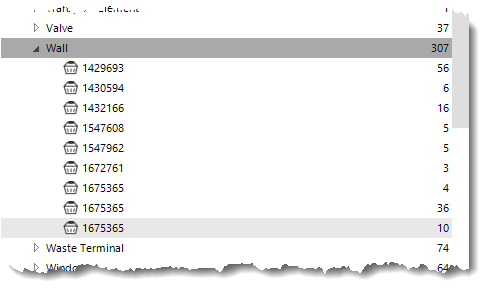
Type objects are handled pretty much the same way as groups in Simplebim. I can delete type objects completely if the downstream use case doesn't need them. I can copy information in both directions, from types to occurrences or from occurrences to types. I can also create type objects of my own and add information to them in several different ways.
This gives me quite a bit of flexibility when working with type objects. I don't have to blindly accept the way they happen to be structured in the original IFC model. I can clean them up, move information between types and occurrences, create missing types, or remove types altogether when they don't provide any value for what I am trying to do.
Basic workflow for deleting and creating type objects in the UI
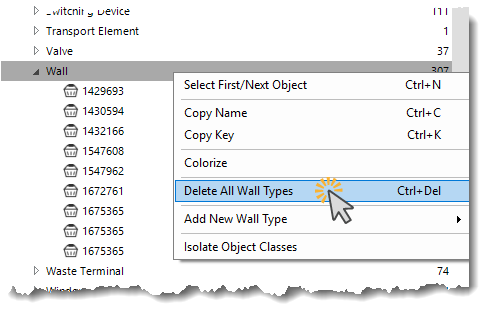
Type objects can be seen in the Objects palette under the corresponding object class. To get rid of all the type objects in a particular object class, I can select the object class, right-click it, and select Delete All Types from the context menu.
You can also see that the same menu has an option to add type objects. This works using the same logic as group generation. Basically, I create a group that represents the type object and assign objects to that group. The group then becomes the type object, which can hold the shared information for the occurrences if needed.
There is an even quicker way to create type objects, though. I can select all the objects in an object class and then drag and drop a property name from the Properties palette onto the object class name of the selected objects in the Objects palette. This creates type objects based on the values of the selected property.
Comments
0 comments
Please sign in to leave a comment.