Too Much Information? Regex to the Rescue Featured

I recently had a project where the architect had done a very thorough job – all doors were clearly labeled, and each label included information about the corresponding room. As a result, every label was unique. There was more information than usual.
The project reached the contractor. From their perspective, there was simply too much information. What they actually needed was just a way to quickly count how many doors had to be ordered.
This is where Simplebim and its Copy Property function helped. On the last line of the dialogue box, there is a feature – Regular expression (regex). As someone from the construction field, this was initially unfamiliar to me, but it has turned out to be very useful for handling large amounts of data.
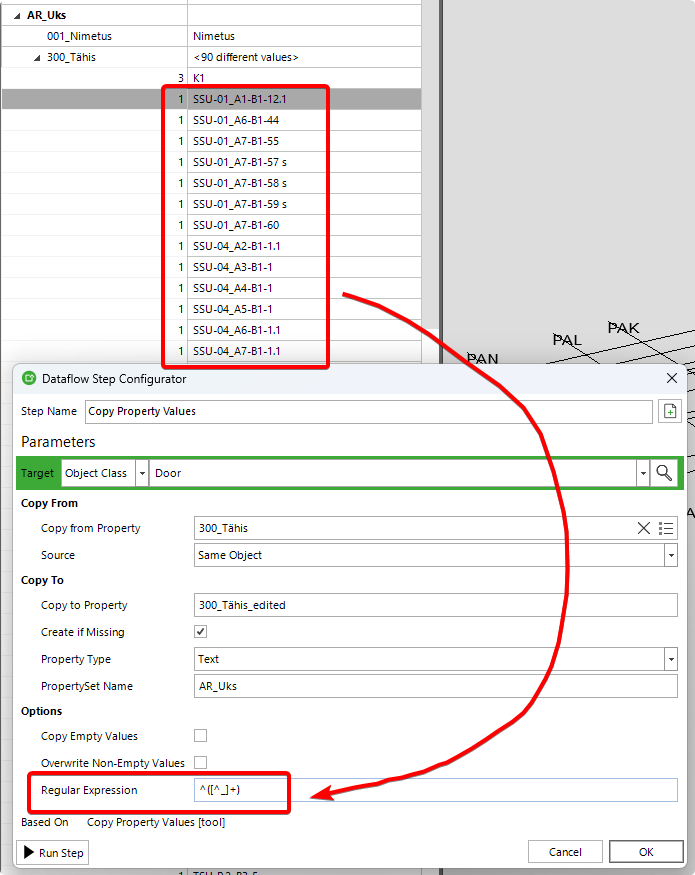
In simple terms, it works like a rule or pattern that helps you find a specific part of a text – for example, “take everything after this symbol” or “skip this part”. It can seem quite technical, and a typical user doesn’t need to fully understand how it works. In this AI age, it’s enough to know that it allows you to precisely control and split text.
And this is where our new “friend”, ChatGPT, came in. I gave it a short description of which part of the text I needed to copy, and it provided a suitable regex.
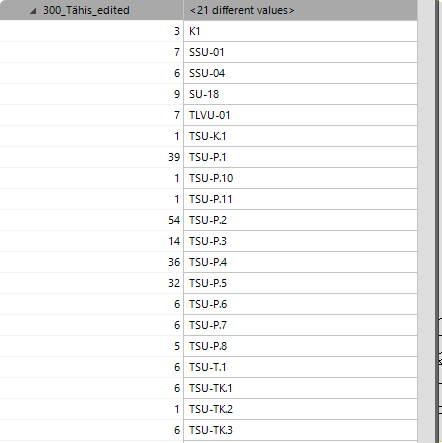
The result? The contractor quickly got exactly the information they needed, and the architect could continue focusing on their core work.
Comments
6 comments
Yeah, ChatGPT is pretty good at crafting regular expressions. Once you’ve got the regex sorted out, this is a good site to test it: regex101: build, test, and debug regex
Yes, regex is really powerful and before we had the likes of ChatGPT it was pretty much just for the few and selected. But now it is so much easier. My own approach to using ChatGPT for creating the correct regex is to describe briefly which part of the full text I need, but not down to the last detail. Then I copy&paste some sample values and for each sample value the part I want to keep. Like this:
…maybe we should one day build this into Simplebim so you could give the prompt from inside Simplebim and test automatically with data from the current model…
Yes, REGEX – even with the old templates – I cover it in 15 minutes during training sessions, and everyone gets the basics, which is all you need for our construction industry.
It’s incredibly powerful yet so little known – well, at least when people aren’t familiar with Simplebim+Regex 😏
Apologies for resurrecting an older topic, but what flavor of regex does Simplebim use? I have a similar case as Piret and need to copy the start of a text property up until the first whitespace character to another property. Somewhat unexpectecly (for me)
^[^\s]+does not seem to work - I think it matches a literal s and not any whitespace - whereas^[^ ]+does do the job.Ville Reima
Simplebim uses the .NET flavor of regex.
I suspect this might have something to do with how we handle backslashes internally before the pattern reaches the regex engine.
In .NET regex, both patterns should be valid, but they behave slightly differently:
If ^[^\s]+ behaves as though \s means a literal s, it could be that the backslash is being removed or interpreted before the regex engine receives the pattern.
We're probably going to integrate a regex tester in a future update. I think that would be a useful addition to help users test and validate their regex patterns.
Thanks Gio! Now that you said it, I tried
^[^\\s]+and that one seems to work fine, so it was an escaping issue. I think this resolves other issues I've had in the past, too 😁Please sign in to leave a comment.