Dealing with GUIDs

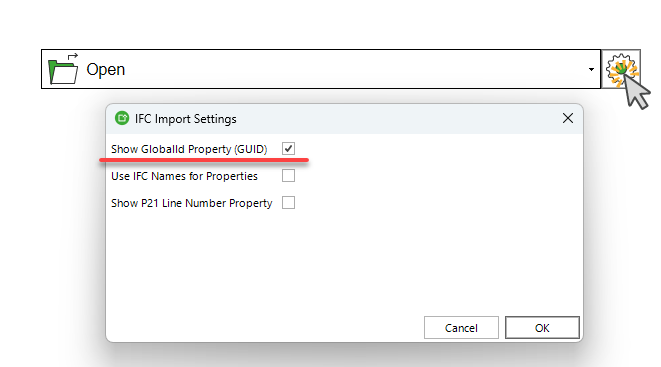
In Simplebim 11, we have plenty of options and features for displaying, generating, and fixing GUIDs. First of all, if you need to see the GUIDs for the objects, there is an import setting that sets the GUIDs as visual properties. When you choose the "Show GlobalId Property (GUID)" option from the IFC import settings, the GUIDs will be displayed like any other IFC property with a value.
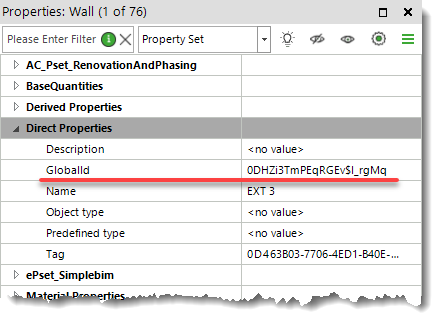
Here is how the GlobalId property appears under Direct Properties in the Properties panel.
Sometimes GUIDs can be broken for many reasons, and it is common for this to cause issues in downstream use cases. You can use the "Edit GUIDs: Repair Duplicate and Invalid GUIDs" tool to repair duplicate and invalid GUIDs in the whole model, as the name of the tool suggests. Read more about the tool in our knowledge base: Edit GUIDs: Repair Duplicate and Invalid GUIDs – Simplebim Community
In some cases, it might be necessary to create completely new GUIDs for all the objects in the model. We have a tool for that too. It is called "Edit GUIDs: Create New GUIDs". Read more about it here: Edit GUIDs: Create New GUIDs – Simplebim Community
Our useful and free add-on called "Prototypes" also includes a couple of helpful GUID-related tools. You can save the selected GUIDs to a text file by using "Save Selected GUIDs to File". The generated text file contains all the GUIDs of the included objects that have geometry. Check the knowledge base for more information: Save Selected GUIDs to File – Simplebim Community
In addition to saving GUIDs to a text file, you can also load and select objects from an IFC file based on their GUIDs. This tool is also included in our "Prototypes" add-on, which you can download through this knowledge base article: Download Prototypes Add-on – Simplebim Community Check the knowledge base for more information: Load Selected GUIDs from File – Simplebim Community
Comments
1 comment
One more, although a bit advanced: When you are splitting objects with Simplebim and want the resulting split objects to always get the same GUIDs, you can use ‘GUID Mapping’ explained in this knowledge base article Map Guids
Please sign in to leave a comment.