Daisy chain - Bulk IFC processing

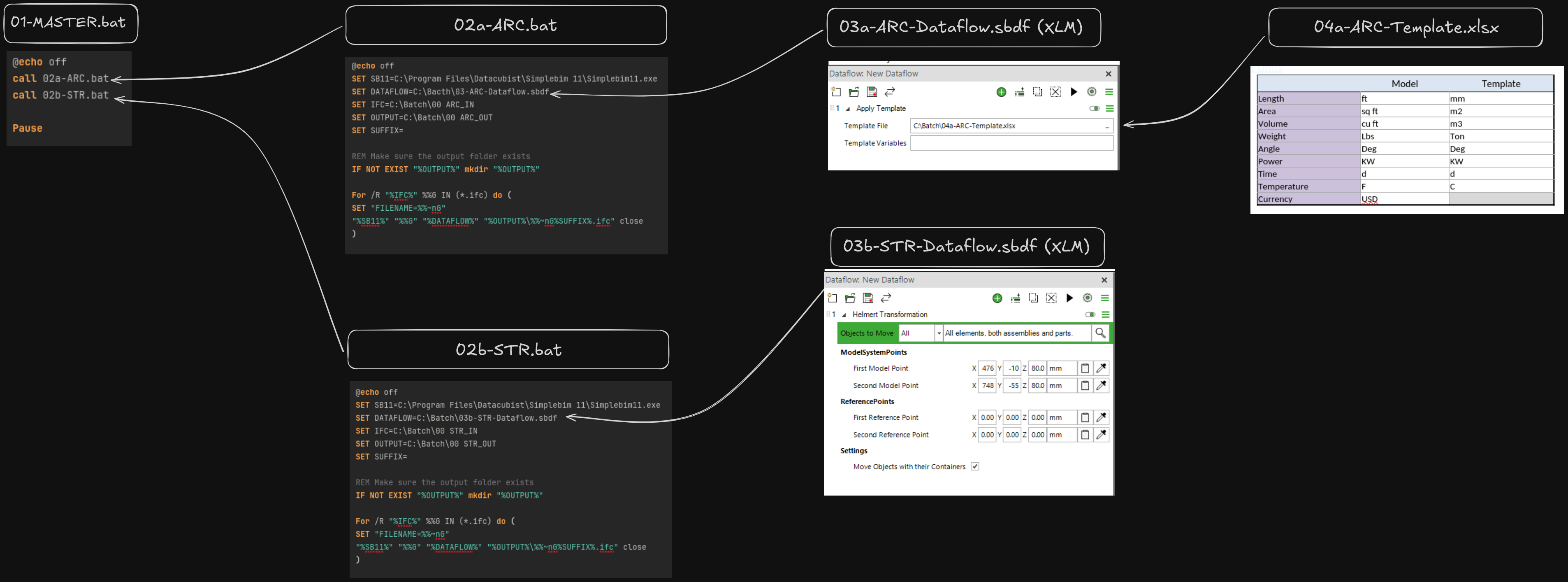
Inspired by Gio's Running dataflows from the command line.
String a number of command line executions to deal with different discipline models requiring individualised processing.
Master.bat:@echo offcall 02a-ARC.batcall 02b-STR.batPause
02a-ARC.bat (similar to 02b-STR.bat):
@echo offSET SB11=C:\Program Files\Datacubist\Simplebim 11\Simplebim11.exeSET DATAFLOW=C:\Bacth\03-ARC-Dataflow.sbdfSET IFC=C:\Batch\00 ARC_INSET OUTPUT=C:\Batch\00 ARC_OUTSET SUFFIX=REM Make sure the output folder existsIF NOT EXIST "%OUTPUT%" mkdir “%OUTPUT%”For /R "%IFC%" %%G IN (*.ifc) do (SET "FILENAME=%%~nG""%SB11%" "%%G" "%DATAFLOW%" "%OUTPUT%\%%~nG%SUFFIX%.ifc" close)
Comments
3 comments
Is each step is started after the previous one completes? If yes, then this will work. The limitation is that you can't start multiple Simplebim ‘runs’ at the same time; the next one can be started after the previous has completed.
For some reason the post was cut down in content.
Each step is completed, before following command is launched with only one instance of SimpleBIM running. This was tested and worked like a treat. Hope this helps others in the community where bulk processing of different design disciplines is required, regardless of the number of models in question.
Thank you, this is very well presented! We are definitely moving into this direction with Simplebim. Once the ‘basic automation’ is running the next bottlenecks will be re-using the automation and reporting what happened during the automation. There will be some related developments in Simplebim 12 and we will tell about those in more detail a bit later :-)
Please sign in to leave a comment.