Creating "hybrid groups" using dataflows

In Simplebim we have two kinds of groups; manual and rule based. Manual groups are great for ad-hoc work, because it is super easy to just drag&drop objects to the groups. Rule based groups are also great, because unlike manual groups they are very efficient and can be re-used with any models.
But then we have cases where rule based groups take us almost there, but there is something special in the model and the rules don't create the 100% correct result. If we start to fine-tune the rules we can easily break something that was working before with other models. In this case the idea of ‘hybrid groups’ comes to rescue.
In a nutshell a hybrid group can be created using a dataflow with 3 steps.
- Create a new rule based group that does the heavy lifting.
- Redefine this group by adding objects to it.
- Redefine this group by removing objects from it.
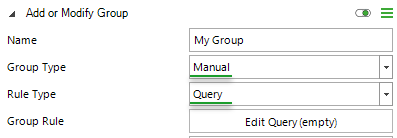
The first step is straight forward. Just create a manual group using any rule.
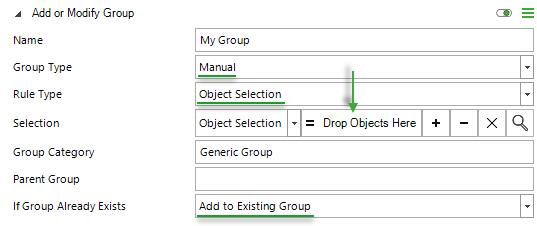
In the second step you re-define the group from step 1 by adding objects to it via drag&drop.
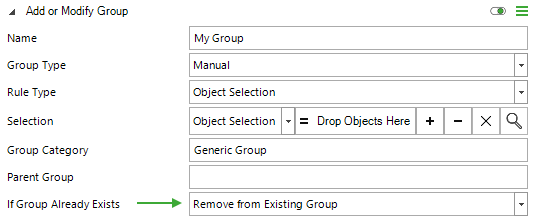
The third step is identical to the second step, except that now you remove objects from the group.
Now you have a setup where the rule based group does most of the work and you can easily fine-tune the result via drag&drop. If you don't need to add/remove anything then you can simply disable the step that is not needed, but you always have the workflow for getting a 100% correct result with any model.
‘Hybrid groups’ are a new idea that was born out of practical needs. The user interface for creating such groups is still a bit rough, but if you like the approach please comment below and we can come up with ways to make this easier and more user friendly.
Comments
0 comments
Please sign in to leave a comment.