
The Include/Exclude Properties tool includes or excludes properties for object classes. Only included properties are exported to IFC from Simplebim.
Excluding or trimming of the properties is one of the main ways to clean up the model data. Removing unnecessary or redundant properties makes the data easier to use, more reliable, and the model file size smaller.
By default, everything in Simplebim is included. The easiest way to include, for example, only one property set (exclude everything else) is to first exclude everything, and then include only the properties or property sets you need.
Settings
Object Class(es)
Defines the object classes whose properties are processed.
The special option All will process all the object classes, including the spatial containers (project, site, building, and building storey).
To target the operation more precisely, choose one object class or many from a list.
Action
Action is defined in two parts. First, choose whether you want to include or exclude properties. Then choose the scope of the action from the following options:
All
Includes or excludes all the properties of the Object Classes.
Properties
Includes or excludes properties defined by the Property Name or Key setting.
Property Set(s)
Includes or excludes properties defined by the Property Set Name and Property Name or Key settings.
Quantity Set(s)
Includes or excludes properties defined by the Quantity Set Name and Property Name or Key settings. Quantity Sets are a special IFC structure, which can only contain measure value properties.
Property Set Name
Defines the Property Set Name(s) if Property Set(s) is chosen above. The Property Set Name may contain wildcards. This allows you to handle multiple property sets at the same time.
For example, to process all the property sets, but not the so-called direct properties or quantity sets, use '*'. To process all the property sets whose name contains 'pset', use '*pset*'.
To handle all the properties within the property set, leave the Property Name setting empty, or use the wildcard '*'.
Quantity Set Name
Defines the Quantity Set Name(s) if Quantity Set(s) is chosen above. The Quantity Set Name may contain wildcards. This allows you to handle multiple quantity sets at the same time.
For example, to process all the quantity sets, but not the so-called direct properties or property sets, use '*'. To process all the quantity sets, whose name contains 'pset', use '*pset*'.
To handle all the properties within the quantity set, leave the Property Name setting empty, or use the wildcard '*'.
Property Name or Key
Defines the properties that are handled. The Property Name or Key may contain wildcards.
To handle all the properties in the Object Classes, use the wildcard '*'.
Note that you can copy or drag and drop the names from the properties palette.
Related to
Comments
6 comments
Sakari Lehtinen
Thank you for the explanation.
By the way, I have a question related to the properties that are marked as read-only. There is a small lock icon next to them. Is it possible to exclude or edit these properties? I have tried both, but I could not. Is there a way to unlock them?
Hello Jiri Hietanen, Thank you! I prefer to answer here because it is more related to this article, and it might be helpful for someone else in the future. :)
Related to the question, Maria actually helped me by defining these following steps:
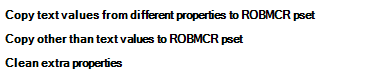
Because I wanted to first transfer the other psets to ROBMCR and then exclude them. It was working perfectly. However, for another IFC that has locked properties, it is not working. I know, as you explained, that this is because they are derived properties. Although, as you can see below, they have their own property set name (they're are not inside Derived Properties pset), but they are also locked:
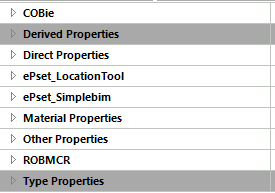
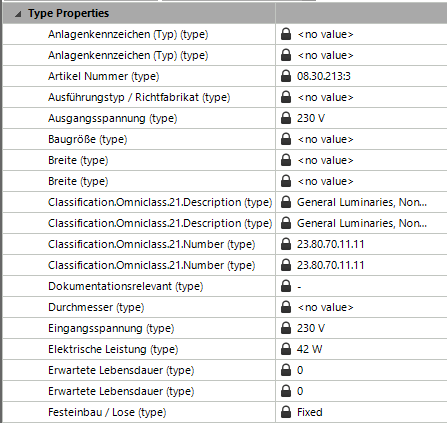
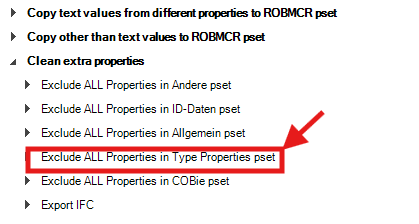
So how can I keep the above-mentioned steps in my dataflow as they are, while excluding the locked Type Properties pset?
Hi Razieh,
The type object properties come from the IFC type objects that are handled in Simplebim as groups and can be found by expanding the object class in the Objects palette. Deleting these type object groups will delete the type properties ‘property set’ in the Properties palette. In a dataflow you can delete the type object groups using the Delete Groups -tool: https://community.simplebim.com/hc/en-us/articles/21330811985564-Delete-Groups
Jiri Hietanen Thank you.
But did I understand this correctly?
We cannot transfer the property values of type properties to other properties, and we cannot simply exclude these properties.The only way to remove the type properties "Property Set" is by deleting the type object groups. Is that correct?
You can copy the property value of type properties to other properties, but you can't exclude them like other properties. The only way to remove them is through the type object groups by deleting the type object group.
If you don't delete the type object groups the properties will be there, but most applications that import IFC don't show these properties for the object instances like Simplebim does (for example showing IFC wall type properties for IFC wall). So, it might be that even if the properties are still in the IFC model they don't bother the next user. But you would have to test if this is the case in your case.
Thank you Jiri Hietanen
Okay, I guess it's more clear to me now.
The software I'm using later is Synchro, and unfortunately type properties are causing problems for me there.
Please sign in to leave a comment.